
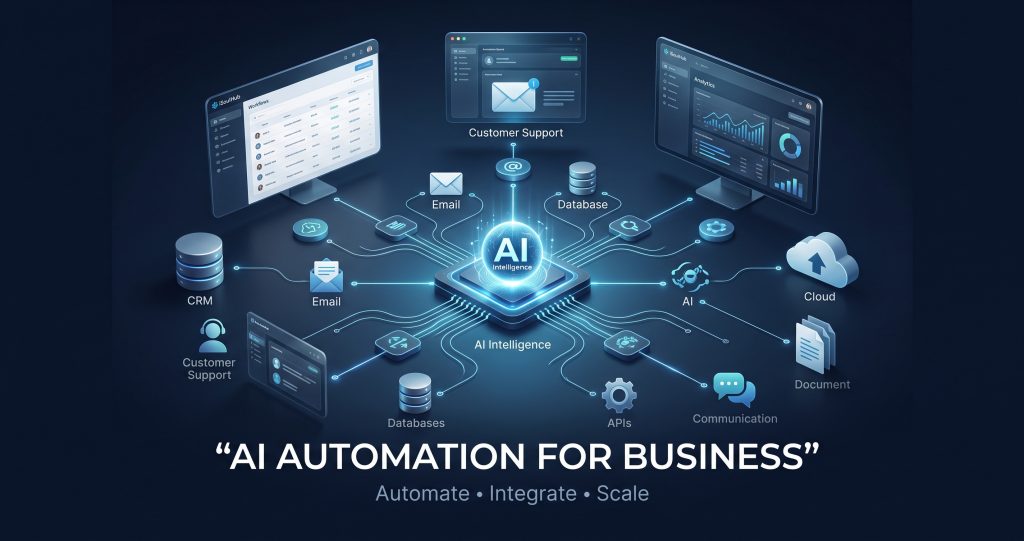
AI automation for business is transforming how organizations reduce repetitive work, improve customer experiences, connect applications and scale operations. By combining AI agents, n8n workflow automation and intelligent business process automation, companies can build connected systems that work faster and require less manual intervention.
Businesses are under increasing pressure to work faster, reduce operational costs, improve customer experience, and scale without continuously increasing headcount.
This is where AI automation for business is changing the way organizations operate.
Traditional automation can perform predefined repetitive tasks. Modern AI automation goes much further. By combining artificial intelligence, AI agents, n8n workflow automation, APIs, business applications, databases, and company knowledge, businesses can build intelligent systems capable of understanding information, making decisions, and taking actions across multiple applications.
At iSoulHub, we design and develop custom AI Automation Services, n8n workflows, AI agents, RAG systems, AI voice agents, chatbots, and business process automation solutions for organizations that want to reduce repetitive work and build more efficient digital operations.
This guide explains what AI automation is, how AI agents and n8n work together, where businesses can use them, and how your organization can start building an AI-powered automation ecosystem.
What Is AI Automation for Business?
AI automation is the combination of artificial intelligence and workflow automation to perform business processes with reduced manual intervention.
Traditional automation generally follows predefined rules:
Trigger → Rule → Action
For example:
A customer submits a form → create a CRM record → send a confirmation email.
AI automation can introduce intelligence into that process:
Trigger → AI Analysis → Decision → Action → Verification → Next Action
An AI-powered lead management system, for example, could:
- Receive a new inquiry.
- Analyze the customer’s message.
- Identify the customer’s requirements.
- Extract important information.
- Classify the lead.
- Assign a lead score.
- Update the CRM.
- Generate a personalized response.
- Notify the appropriate sales representative.
- Schedule follow-up actions.
Instead of automating only individual tasks, organizations can automate complete business processes.
Watch: Transform Your Business with AI Automation
See how iSoulHub helps businesses automate processes using AI agents, n8n workflows and intelligent business automation.
What Are AI Agents?
Platforms such as n8n enable businesses to build AI agents that can interact with business applications, APIs, databases, knowledge sources and other tools while incorporating predefined logic and human oversight
A normal chatbot primarily generates responses.
An AI agent can potentially take action.
For example, a customer-service AI agent could be connected to:
- CRM software
- ERP systems
- Google Sheets
- Databases
- Company documents
- Ticketing systems
- Calendars
- APIs
- Knowledge bases
A customer might ask:
“What is the status of my order?”
Instead of generating a generic response, an appropriately designed AI agent could identify the customer, retrieve authorized order information from the relevant system, check its current status and provide a contextual response.
This is what makes AI Agent Development particularly valuable for organizations that want intelligent systems capable of interacting with business applications, company knowledge, customers, and internal workflows.
What Is n8n Workflow Automation?
n8n is a workflow automation platform that enables applications, APIs, databases and AI models to work together through automated workflows. It combines visual workflow development with the ability to add custom logic and code, making it suitable for advanced business automation.
It is particularly useful for advanced automation because organizations can combine visual workflow development with custom logic and code.
A typical n8n automation could look like:
Website Form → n8n → AI Agent → CRM → Email → Google Sheets → Sales Team
More sophisticated implementations can incorporate:
AI Models + APIs + Databases + Vector Databases + RAG + Business Rules + Human Approval + External Applications
This allows businesses to build anything from straightforward workflow automation to sophisticated AI-agent systems.
AI Agents + n8n: A Powerful Combination
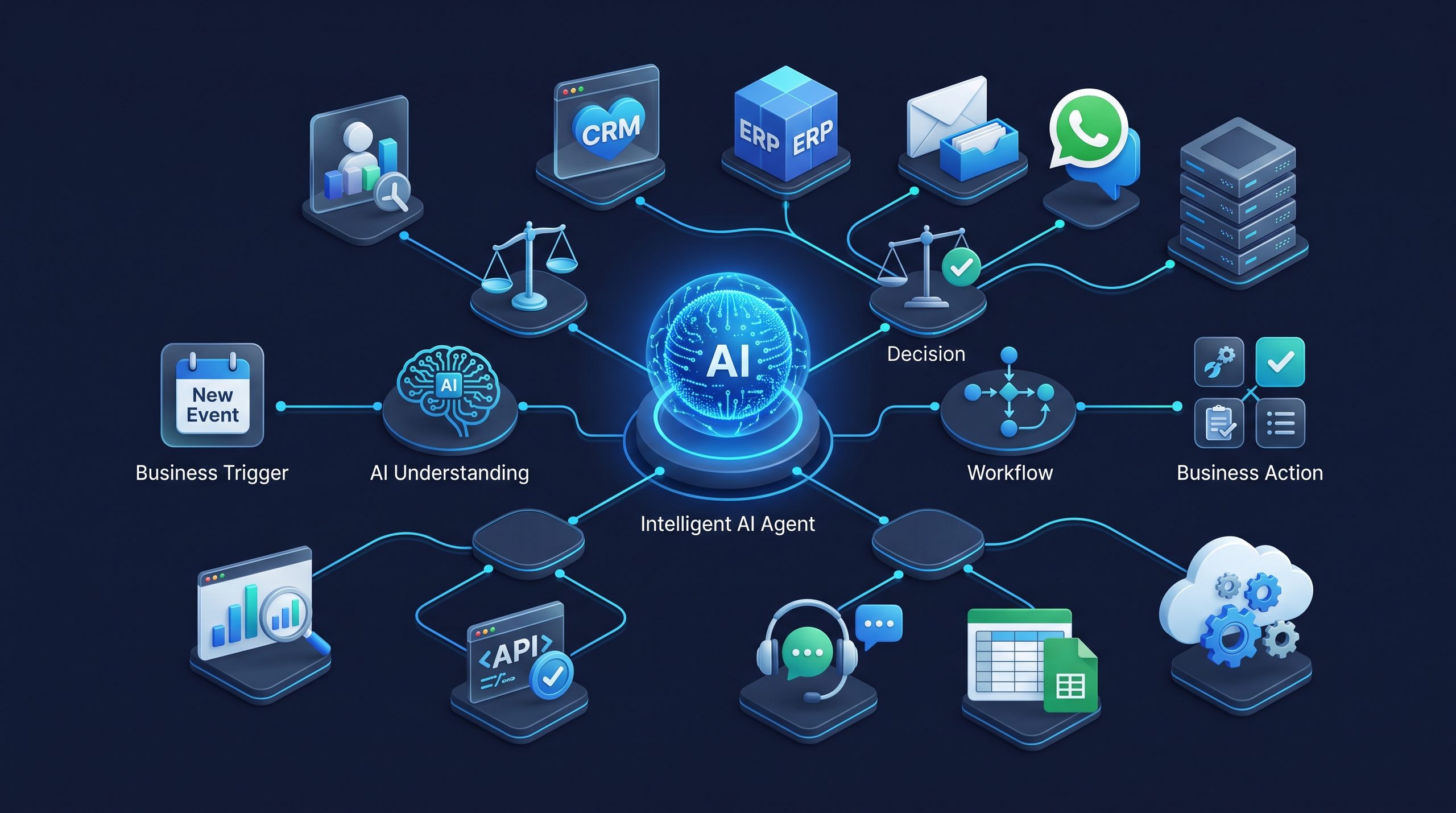
One advantage of workflow orchestration is the ability to connect AI with a broad range of business applications. n8n, for example, provides an extensive library of application and software integrations for connecting workflows with external systems.
AI agents provide intelligence.
n8n provides orchestration and connectivity.
Combined, they can create an intelligent automation layer between business applications.
Consider an incoming customer inquiry.
Step 1 — Trigger
A customer contacts the business through:
- Website
- Chat
- CRM
- API
- Phone/voice system
Step 2 — AI Understanding
An AI model analyzes the request and determines:
- Customer intent
- Required information
- Priority
- Sentiment
- Appropriate department
- Next action
Step 3 — Business Data Retrieval
The workflow can retrieve authorized information from:
- CRM
- ERP
- SQL databases
- Google Sheets
- Internal APIs
- Company knowledge bases
- Documents
Step 4 — Decision
Business rules and AI can determine what should happen next.
Step 5 — Action
The workflow might:
- Reply to the customer
- Create a support ticket
- Update CRM records
- Notify an employee
- Generate a quotation
- Schedule a meeting
- Trigger another workflow
Step 6 — Human Approval
High-impact actions can be routed to employees for approval before execution.
This combination of AI reasoning and deterministic business rules is particularly valuable for production automation.
15 Ways to Use AI Automation for Business
1. AI Customer Support
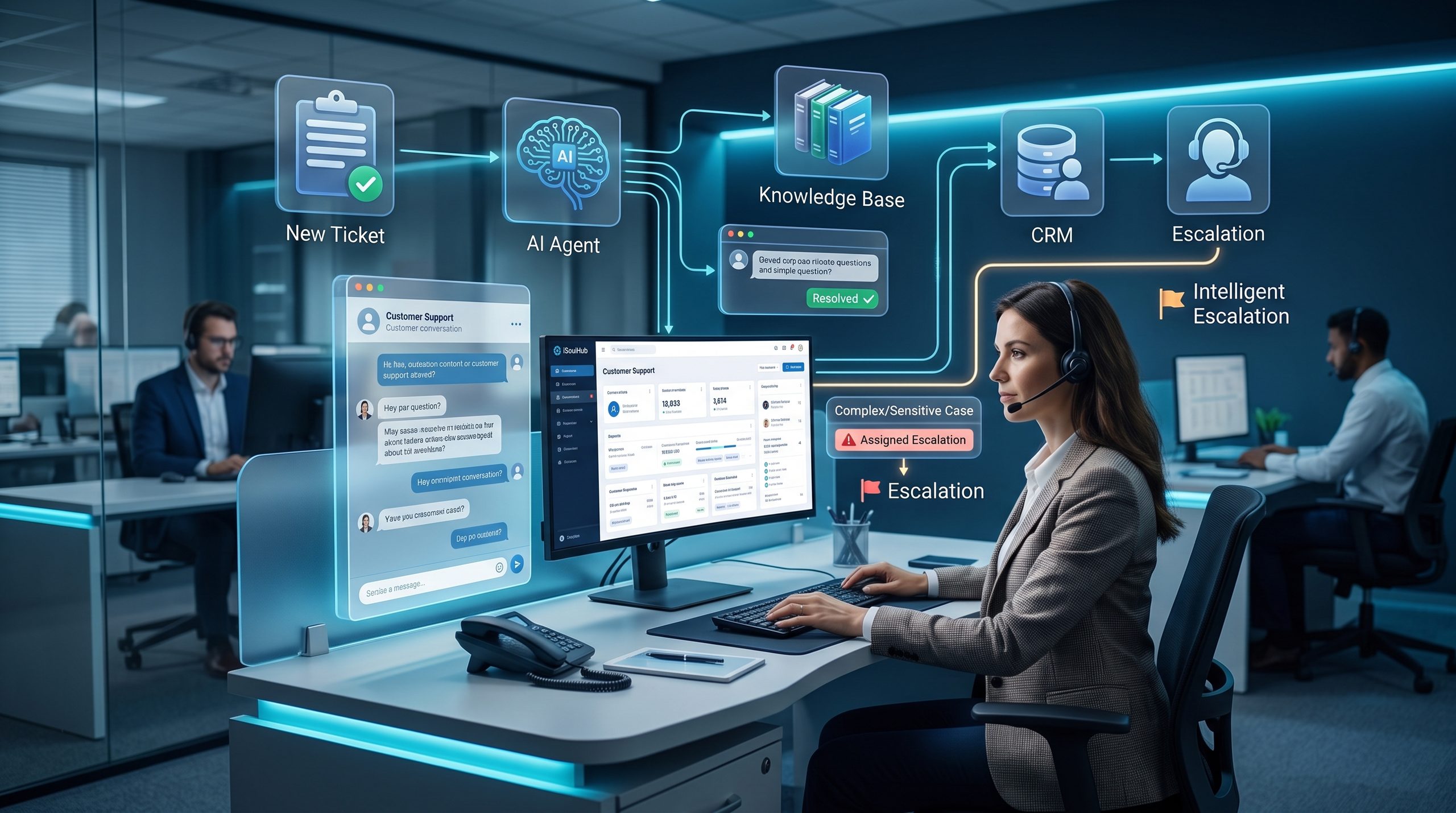
AI customer-support agents can answer frequently asked questions, retrieve information from approved knowledge sources and route complicated cases to human employees.
They can operate through:
- Website chat
- Social channels
- Internal portals
This can reduce repetitive support workload while improving response times.
2. AI Lead Qualification
AI can analyze incoming leads and identify:
- Customer requirements
- Business type
- Requested service
- Budget indicators
- Lead quality
- Urgency
The workflow can then update the CRM and assign the lead to the appropriate salesperson.
3. Email Automation
Businesses process enormous volumes of email.
AI-powered workflows can:
- Categorize incoming messages
- Extract information
- Generate draft responses
- Route emails
- Create tickets
- Trigger approvals
- Send notifications
- Update business systems
4. WhatsApp Automation
WhatsApp can become much more than an automated FAQ channel.
A properly integrated WhatsApp AI agent could communicate with CRM systems, databases, scheduling applications and business workflows.
Potential applications include:
- Customer support
- Lead qualification
- Appointment scheduling
- Order updates
- Service requests
- Sales follow-ups
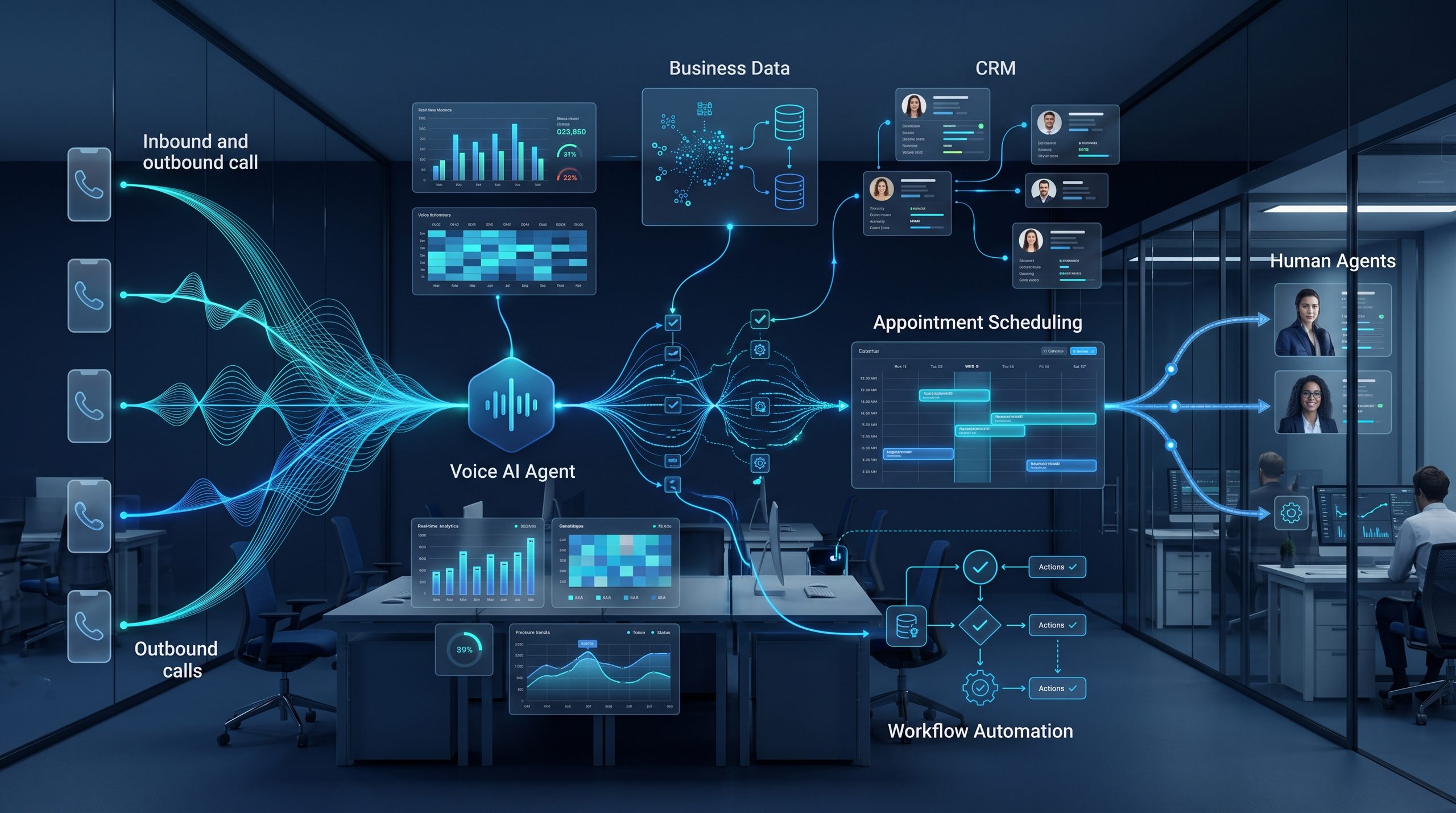
5. AI Voice and Calling Agents
AI voice agents can automate certain inbound and outbound telephone interactions.
Examples include:
- Appointment confirmations
- Lead qualification
- Customer-support triage
- Survey calls
- Reminder calls
- Basic information services
Voice AI can also connect to backend automation workflows so that information collected during calls can trigger business actions.
6. CRM Automation
AI and n8n can automate CRM operations such as:
- Creating leads
- Updating records
- Lead scoring
- Follow-up reminders
- Sales notifications
- Customer classification
- Pipeline updates
This helps sales teams spend more time communicating with customers rather than manually maintaining records.
7. ERP Automation
Organizations frequently have information distributed between ERP systems, spreadsheets, email and other applications.
Automation can connect these systems through APIs and workflows, reducing duplicate data entry and improving information flow.
8. RAG and AI Knowledge Bases
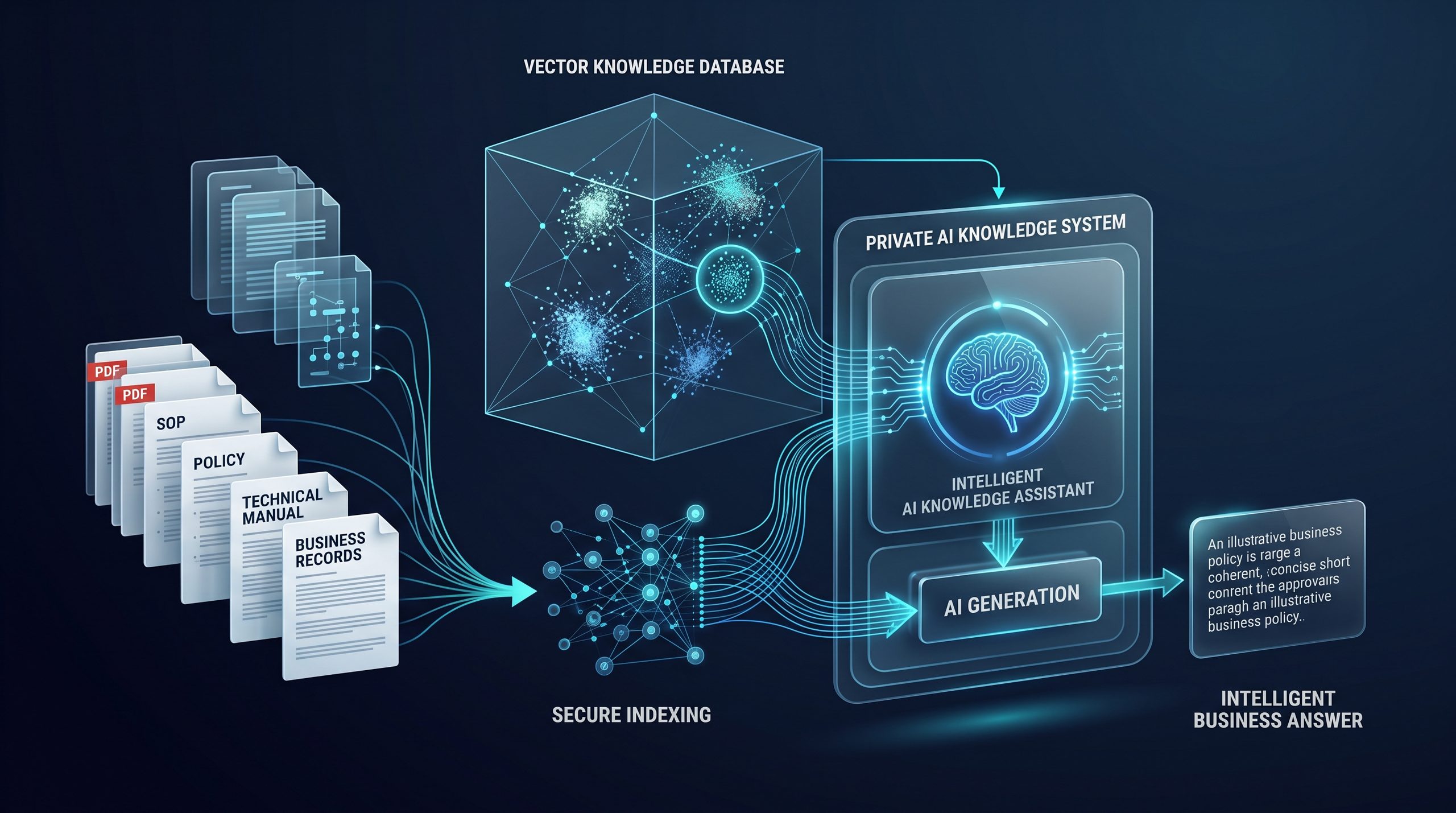
One of the most useful enterprise AI technologies is Retrieval-Augmented Generation (RAG).
RAG allows an AI assistant to retrieve relevant information from an organization’s approved knowledge sources before generating an answer.
Sources might include:
- SOPs
- Policies
- Manuals
- Product documentation
- Contracts
- Technical documents
- FAQs
- Internal knowledge bases
A staff member could ask:
“What is our procedure for handling this request?”
The system can search relevant company documents and generate a response grounded in retrieved information.
9. Document Processing
AI automation can assist with processing:
- PDFs
- Invoices
- Purchase orders
- Forms
- Reports
- Applications
- Contracts
Information can be extracted, classified and passed to other systems for validation or human review.
10. Sales Automation
Sales workflows can automate:
Lead Capture → Qualification → CRM → Assignment → Follow-up → Reporting
AI can add intelligence to several stages of this process while humans remain responsible for decisions where judgment or approval is required.
11. Marketing Automation
AI-powered marketing workflows can help teams with:
- Content research
- Campaign preparation
- Lead segmentation
- Email personalization
- Social-media workflows
- Performance reporting
- Content repurposing
12. Social Media Automation
Businesses can build workflows that coordinate:
Content Idea → Draft → Image/Video → Human Approval → Publishing → Analytics
Human review can remain part of the process while repetitive operational work is automated.
13. Automated Reporting
Instead of manually collecting data from several platforms every day, automation can retrieve and consolidate information automatically.
AI can then help summarize:
- KPIs
- Exceptions
- Trends
- Operational issues
- Sales performance
- Marketing results
Reports can be distributed automatically to management.
14. IT Operations Automation
IT departments can use AI automation for:
- Helpdesk ticket classification
- User-request routing
- System notifications
- Incident summaries
- Knowledge-base assistance
- Asset workflows
- Routine administrative processes
15. Multi-Agent AI Systems
More advanced environments can use multiple specialized AI agents.
For example:
Coordinator Agent
↓
Sales Agent | Support Agent | Research Agent | Reporting Agent
↓
CRM | ERP | Email | Database | APIs
Each agent can have a specific responsibility while an orchestration layer controls the overall process.
What Is Agentic AI?
Agentic AI refers to AI systems designed to pursue objectives, determine appropriate actions and interact with tools or other systems with varying degrees of autonomy.
Traditional software might execute:
A → B → C → D
An agentic system may determine whether the next appropriate action should be:
A → C → Tool → Analysis → Human Approval → D
depending on the situation.
For businesses, the goal should not necessarily be maximum autonomy.
The better objective is controlled autonomy.
Important production workflows should include safeguards such as:
- Business rules
- Permission controls
- Human approvals
- Validation
- Logging
- Error handling
- Monitoring
- Audit trails
What Is Business Process Automation?
Business Process Automation uses technology to automate repeatable processes across an organization. When BPA is combined with AI agents and workflow automation, businesses can go beyond simple rule-based tasks and automate more complex processes involving documents, natural language, decision support, and multiple business applications.
Examples include:
HR
Employee onboarding, document processing and notifications.
Finance
Invoice processing, approvals, reporting and reconciliation workflows.
Sales
Lead management, CRM updates and follow-ups.
Customer Support
Ticket classification, knowledge retrieval and escalation.
IT
Helpdesk workflows, alerts and routine administrative tasks.
Operations
Approvals, status tracking, reporting and notifications.
AI extends traditional BPA by allowing workflows to work with unstructured information such as natural-language messages and documents.
Benefits of AI Automation for Business
Reduce Manual Work
Employees can spend less time copying information between applications and performing repetitive administrative activities.
Faster Response Times
Automated workflows can process events immediately rather than waiting for someone to manually initiate the next step.
Improved Customer Experience
Customers can receive faster responses and more consistent service.
Connect Disconnected Applications
Automation can provide a workflow layer between systems that otherwise operate independently.
Scale Operations
A well-designed automated process can process higher transaction volumes without requiring a proportional increase in manual effort.
Improve Data Consistency
Automated data transfer can reduce errors caused by repetitive manual entry.
24/7 Automation
Digital workflows can continue processing appropriate tasks outside normal working hours.
Why Self-Hosted AI Automation Matters
Not every organization wants all business information processed through external cloud services.
For organizations with stronger privacy, control or infrastructure requirements, self-hosted AI and automation can be an important option.
Depending on architecture and requirements, components may include:
- Self-hosted n8n
- Local AI models
- Private databases
- Vector databases
- Private RAG
- Internal APIs
- On-premises infrastructure
This can provide organizations with greater control over where information is stored and processed.
Cloud AI vs Self-Hosted AI
| Cloud AI | Self-Hosted AI |
|---|---|
| Faster initial deployment | Greater infrastructure control |
| Managed infrastructure | Can operate on private infrastructure |
| Easy access to advanced models | Greater control over sensitive data flows |
| Usage-based services | Infrastructure requires management |
| Suitable for many businesses | Useful for privacy-conscious organizations |
The right architecture depends on security, performance, budget, compliance and business requirements.
Hybrid architectures are also possible.
How to Start AI Automation for Your Business
The best starting point is usually not automating everything at once.
Start with processes that are:
- Repetitive
- Time-consuming
- Rules-based
- High-volume
- Error-prone
- Spread across multiple applications
Step 1: Identify the Process
Document the current workflow.
Step 2: Identify Applications and Data
Determine which systems need to communicate.
Step 3: Separate Rules from Intelligence
Determine which decisions should be deterministic and where AI genuinely adds value.
Step 4: Design the Workflow
Map triggers, processing steps, integrations, approvals and outputs.
Step 5: Build and Integrate
Connect APIs, databases, AI models and applications.
Step 6: Test
Test normal scenarios, errors and edge cases.
Step 7: Deploy Gradually
Introduce automation in controlled stages.
Step 8: Monitor and Improve
Measure results and continuously optimize the workflow.
Why Choose iSoulHub for Business AI Automation?
iSoulHub is an AI automation and AI agent development company based in Lahore, Pakistan, serving businesses globally. We help organizations connect applications, automate repetitive processes, deploy intelligent AI agents, and develop custom AI-powered workflows around their operational requirements.
We develop custom automation systems around business requirements rather than forcing every organization into the same automation template.
Our services include:
- AI Automation
- AI Agent Development
- n8n Workflow Automation
- Business Process Automation
- Agentic AI Solutions
- AI Voice & Calling Agents
- AI Chatbots
- Customer Support AI Agents
- RAG Solutions
- AI Knowledge Bases
- CRM Automation
- ERP Automation
- WhatsApp Automation
- Email Automation
- Lead Automation
- API Integration
- Sales Automation
- Marketing Automation
- Social Media Automation
- Custom AI Workflows
- Self-Hosted AI
- Private AI Solutions
Build Your AI-Powered Business
AI automation does not have to mean replacing your existing business systems.
Often, the greatest value comes from connecting the systems you already use and automating the repetitive work between them.
Whether you need one n8n workflow, an AI customer-support assistant, a private RAG knowledge base, an AI calling agent or a broader automation ecosystem, iSoulHub can design a solution around your operational requirements.
Ready to automate your business?
Contact iSoulHub to discuss your AI automation requirements and explore how AI agents and workflow automation can help your organization automate, integrate, and scale.
Email: atif@isoulhub.com
iSoulHub — Automate. Integrate. Scale with AI.
Frequently Asked Questions About AI Automation
What is AI automation for business?
AI automation combines artificial intelligence with workflow automation to automate business processes, analyze information, assist with decisions and trigger actions across connected applications.
What is an AI automation company?
An AI automation company designs and implements systems that use AI models, workflow automation, APIs, databases and business applications to automate operational processes.
What is n8n automation?
n8n automation uses the n8n workflow automation platform to connect applications, APIs, databases and AI services into automated workflows.
Can n8n be used for AI agents?
Yes. n8n can orchestrate AI agents and connect them with models, tools, APIs, databases, RAG systems and business applications.
What is a RAG AI agent?
A RAG AI agent retrieves relevant information from designated knowledge sources before generating responses or taking permitted actions. This is particularly useful for company-document assistants and knowledge-base applications.
Can AI automate customer support?
Yes. AI can assist with FAQs, ticket classification, knowledge retrieval, customer communication and escalation to human agents.
Can AI automation integrate with existing software?
In many cases, yes. Applications with APIs, webhooks, databases or supported integrations can often be incorporated into an automation workflow.
Can AI automation be self-hosted?
Yes. Depending on the technology stack, components such as n8n, databases, vector databases and some AI models can be deployed on private or on-premises infrastructure.
How much does AI automation cost?
Cost depends on workflow complexity, integrations, AI usage, infrastructure, security requirements and the number of processes being automated. A focused automation assessment is normally required before estimating implementation cost.
How do I start automating my business with AI?
Start by identifying repetitive, high-volume processes that consume significant employee time. Map the existing process and systems, then determine where traditional workflow automation or AI can generate measurable value.